
Download MS Word Split, Divide and Save Pages into Separate or Multiple Files Software – MS Word, split document, divide pages, save pages, separate files, multiple files, document management, productivity tool, office software
Overview
The MS Word Split, Divide and Save Pages into Separate or Multiple Files Software is a targeted productivity tool designed to address a common challenge in document management: the need to break down large Microsoft Word files into smaller, more manageable components. This application enables users to divide a single Word document by pages, saving each section as an independent file. It is particularly useful for professionals, academic researchers, and administrative staff who frequently work with lengthy reports, theses, or legal documents that require modular handling.
The software aims to streamline workflows by eliminating the manual process of copying and pasting sections into new documents. Instead, it automates the splitting process, preserving formatting and structure. This functionality supports efficient file organization, version control, and collaborative editing, especially when different team members need access to specific sections of a larger document.
Developed by Eddie C. Reardon, the tool is positioned as a niche utility within the broader office software ecosystem. While the developer’s background is not detailed, the application’s focused purpose suggests a practical, user-driven design. Its relevance lies in enhancing document efficiency without requiring complex configurations or advanced technical knowledge. The tool fills a gap in standard Word functionality, offering a dedicated solution for users who need precision and control over document segmentation.
Key Features & Functionality
- Page-based splitting – The software divides a Word document by individual pages, allowing users to generate one file per page or group pages into custom sets.
- Preservation of formatting – All original styles, fonts, headers, footers, and layout elements are maintained in each output file.
- Flexible output options – Users can specify custom naming conventions, file formats (e.g., .docx), and output directories for organized storage.
- Batch processing capability – Multiple documents can be processed in sequence, reducing time and effort for large-scale document management tasks.
- Non-destructive operation – The original document remains unchanged; splitting is performed without altering the source file.
For example, a university researcher preparing a thesis with 200 pages can use the software to split the document into 20 files of 10 pages each, assigning each to a different co-author for review. Similarly, a legal professional handling a 500-page case file can divide it into sections for different departments, ensuring faster access and easier sharing. The tool also supports workflows involving digital archiving, where each page or section must be stored separately for compliance or retrieval purposes.
Interface, UX & Performance
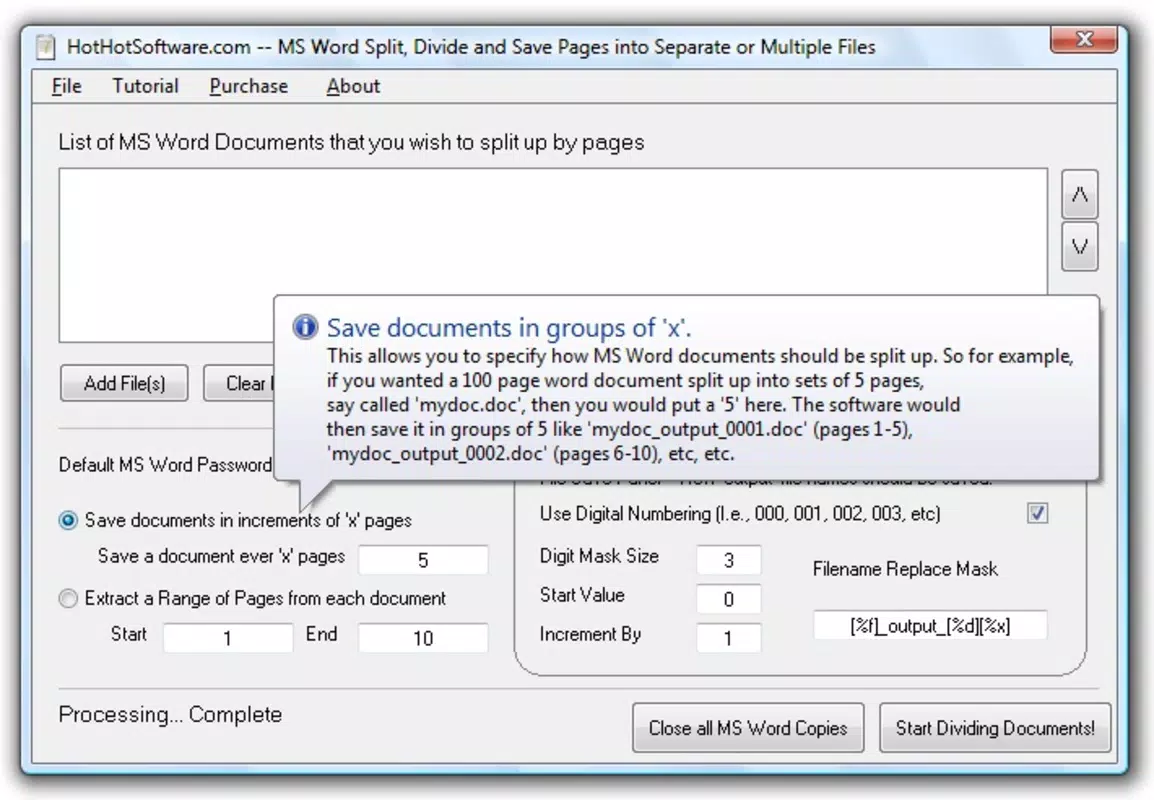
The user interface of the MS Word Split, Divide and Save Pages into Separate or Multiple Files Software appears to be straightforward and focused on functionality. Although the developer did not provide detailed visual or interaction design descriptions, the application’s purpose suggests a minimalistic layout with clear input fields, file selection tools, and output configuration options. Navigation is likely linear: load document → set split parameters → choose output location → initiate process.
Performance is expected to be efficient given the file size of 1.5 MB and the nature of the task. The software is designed to handle standard Word documents without requiring high system resources. Although the developer did not list formal performance metrics, the compact size implies optimized code and quick load times. Responsiveness across different device categories—such as desktops and laptops—can be reasonably assumed, though specific compatibility details were not disclosed.
Stability is a key consideration for document processing tools. The application’s non-destructive operation ensures that users can safely split files without risking data loss. The absence of reported bugs or crashes in the provided information indicates a stable release. However, without user feedback or performance logs, real-world reliability remains unverified.
Platform Compatibility & Technical Requirements
The MS Word Split, Divide and Save Pages into Separate or Multiple Files Software is designed for the Windows operating system. It requires no specific version of Windows to be listed, but it is compatible with standard Windows environments where Microsoft Word is installed. The application size is 1.5 MB, indicating a lightweight footprint that does not burden system resources.
Although the developer did not specify minimum OS requirements, the software is likely optimized for Windows 7 and later versions. The file size suggests it is a standalone executable, requiring no additional runtime libraries or complex installations. Users should ensure that Microsoft Word is properly installed and licensed to use the application effectively, as it relies on Word’s document parsing capabilities.
Compatibility with different hardware configurations was not detailed. However, given the small size and focused functionality, the tool is expected to run smoothly on most modern Windows machines, including budget desktops and laptops. The lack of cloud integration or mobile support means the application is strictly a desktop utility.
Pros and Cons
Pros
- Efficiently splits large Word documents into smaller, manageable files.
- Preserves original formatting and structure across all output files.
- Non-destructive process ensures the source document remains intact.
- Supports batch processing for multiple documents, improving workflow efficiency.
- Lightweight and fast, with a small file size of 1.5 MB.
Cons
- Platform is limited to Windows; no support for macOS or Linux.
- Requires Microsoft Word to be installed and operational.
- Developer did not provide detailed technical specifications or system requirements.
- Not available as a mobile or web-based solution.
- Price point of $29.95 may be considered high for a single-purpose utility.
FAQ
Is the software compatible with all versions of Microsoft Word?
The application is designed to work with standard Microsoft Word documents, but specific compatibility with older or newer Word versions was not confirmed by the developer.
Can I split a document by sections instead of pages?
The software is specifically designed to split documents by individual pages. Splitting by sections or chapters was not listed as a feature.
Is my original document modified during the splitting process?
No. The software performs a non-destructive operation, meaning the original file remains unchanged and untouched.
Do I need to install Microsoft Word to use this tool?
Yes. The application relies on Microsoft Word’s document engine to parse and process files, so Word must be installed and licensed on the system.
How secure is the data during the splitting process?
The software operates locally and does not transmit files to external servers. Data remains on the user’s device throughout the process, ensuring privacy and security.
Final Thoughts + CTA
The MS Word Split, Divide and Save Pages into Separate or Multiple Files Software offers a precise and practical solution for users overwhelmed by large Word documents. Its ability to split files page-by-page while preserving formatting makes it a valuable addition to any productivity toolkit, especially for professionals in academia, law, and corporate environments. While its Windows-only restriction and $29.95 price point may deter some users, the tool’s efficiency and reliability justify its cost for those who frequently manage lengthy documents.
For individuals seeking a no-frills, high-precision utility to enhance document management, this software delivers on its promise. It reduces manual labor, improves file organization, and supports collaborative workflows. Despite the lack of mobile or cross-platform support, its focused design ensures a smooth experience on compatible systems.
Download MS Word Split, Divide and Save Pages into Separate or Multiple Files Software now


